
Enroll to explore sandbox
Kindly fill up the following to try out our sandbox experience. We will get back to you at the earliest.
Kindly fill up the following to try out our sandbox experience. We will get back to you at the earliest.
Four unstructured data discovery strategies and twelve tools compared, with the published per gigabyte scan costs and the file size limits that decide real coverage.

Updated on

Unstructured data discovery is the process of finding out what sits inside files that carry no schema: documents, spreadsheets, PDFs, images, scans, audio, email and the objects in a storage bucket. The reason it needs its own article, rather than a section in a general one, is that almost nothing from the structured playbook survives the move. If you are looking for the structured half of this problem, the tools that profile warehouse tables and map columns, that is covered in our comparison of data discovery tools for structured sources. This page is about the other half.
Discovery on a warehouse table is a metadata operation. The table already declares its own shape, so a tool reads the schema, samples some rows, profiles each column and comes back with types, null rates, distinct counts and a classification per column. It never has to guess what a field is for, because the field has a name and a type.
A PDF declares nothing. To find out what is in it, a tool has to open the file, work out its format, extract the text, run optical character recognition if the text is an image of text rather than text, and then run pattern matching and language models over whatever came out. Every one of those steps can fail quietly. A password protected file yields nothing. A scanned contract yields nothing without OCR. A file larger than the scanner's sampling window yields its file name and nothing else.
So the useful definition is this: unstructured data discovery is inventory plus extraction plus classification, where the extraction step is the one that decides your real coverage. A vendor that lists a hundred connectors and never publishes its file size limits has told you about the easy step and stayed silent about the hard one.
Unstructured data is content that carries no predefined format or structure, which makes it harder to collect, process and analyze than data that arrives in rows and columns. In practice it means five families of content, and they behave differently enough that a tool good at one can be useless at another.
What makes this matter commercially is not the share of data involved but its location. The five families above sit outside the systems most governance programs actually cover. A catalog that maps every table in the warehouse is genuinely useful and still tells you nothing about the folder of scanned onboarding forms on a file server, which is exactly where a regulator will look first.

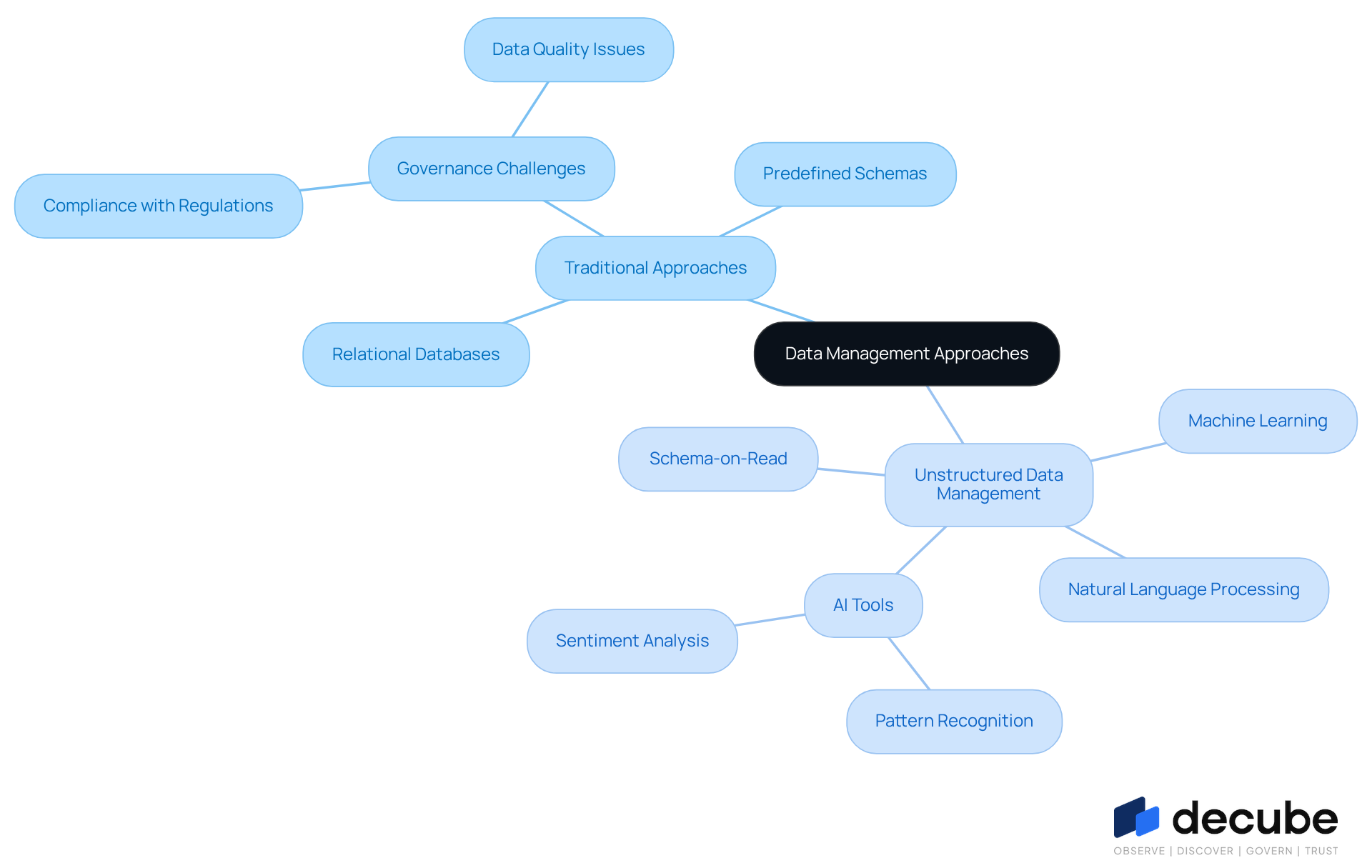
Traditional data management assumes a schema written before the data arrives. Relational databases enforce it, warehouses inherit it, and the whole discipline of profiling, quality testing and lineage is built on the assumption that a column means the same thing in every row. That assumption is what makes the structured toolchain cheap to run.
Unstructured content inverts it. There is no schema to enforce, so meaning has to be derived at read time, per file, every time the file changes. Four things break as a result, and they are worth naming individually because each one has a different fix.
This is the single most useful thing to understand before you evaluate any tool, and it is the thing no competing page on this subject explains. Classification of a column and classification of a document are not the same operation, and they fail in opposite ways.
On a column, a classifier is doing statistics. It samples values and asks whether enough of them match a pattern to justify labeling the whole column. Microsoft states the threshold its Data Map scanner uses, and then states plainly that the threshold does not apply to documents. From the Microsoft Purview Data Map supported sources documentation, at learn.microsoft.com/en-us/purview/data-map-data-sources, read on 6 September 2026:
For unstructured data formats, such as DOCX files, there's no requirement to meet a condition of eight distinct values. The presence of a single relevant keyword is sufficient for classification.
That one sentence explains most of the frustration teams report in their first quarter with a discovery tool. On the structured side, a column has to look like credit card numbers eight distinct times before it is called one. On the unstructured side, one keyword in a 40 page document is enough to label the whole document. A staff handbook that mentions the phrase "passport number" once comes back flagged the same way a folder of actual passport scans does.
The operating rule that follows is a triage rule, not a tuning rule. Do not try to make document classification as precise as column classification, because the unit of analysis will not allow it. Instead, rank findings by exposure before you rank them by confidence: a low confidence hit in a folder that everyone in the company can read outranks a high confidence hit in a folder two people can reach. That is why the tools built for file shares pair classification with permissions, and why a catalog, which knows nothing about file permissions, cannot do this part of the job at all.
The second thing that decides real coverage is how much of each file the scanner actually reads. The same Microsoft documentation is unusually direct about it:
For document file formats, it samples the first 20 MB of each file. If a document file is larger than 20 MB, the scanner doesn't perform a deep scan (subject to classification). In that case, Microsoft Purview captures only basic metadata like file name and fully qualified name.
Google publishes its own equivalent limits. Its discovery service covers supported images below 4 MiB and rich documents below 30 MiB, and it does not sample at all in its OCR and intelligent document parsing modes, which means those files are read in full or not at all. Before you accept any coverage claim from any vendor, run a size histogram over your own buckets and see what fraction of your files sits above these thresholds. On a typical archive of scanned records, a surprising amount does.
Unstructured discovery is the only part of the data governance stack that is billed by the byte, and that is what makes it possible to budget honestly instead of guessing. Every price below was read from the vendor's own public pricing page on 6 September 2026. The Amazon figures are the US East (Northern Virginia) rates.
| Service and mode | Published unit price | Cost to cover 10 TB (10,240 GB) |
|---|---|---|
| Decube, Starter plan | 175 USD per user per month, annual subscription from 21,000 USD, minimum 10 users | Priced per user and per source, not per gigabyte |
| Decube, Growth plan | 225 USD per user per month, annual subscription from 54,000 USD, minimum 20 users | Priced per user and per source, not per gigabyte |
| Amazon Macie, sensitive data discovery | 1 USD per GB, with a 1 GB free tier for automated discovery | 10,240 USD if every byte is inspected |
| Amazon Macie, S3 bucket evaluation | 0.10 USD per S3 bucket per month | Independent of volume. 100 buckets costs 10 USD a month |
| Amazon Macie, S3 object monitoring | 0.01 USD per 100,000 objects | Independent of size. 10 million objects costs 1 USD |
| Google Cloud Sensitive Data Protection, discovery profiling | 0.03 USD per GB profiled | 307.20 USD |
| Google Cloud Sensitive Data Protection, storage inspection, 1 GB to 50 TB | 1.00 USD per GB per month | 10,240 USD |
| Google Cloud Sensitive Data Protection, storage inspection, over 50 TB | 0.75 USD per GB per month | Applies to the portion above 50 TB |
| Google Cloud Sensitive Data Protection, storage inspection, over 500 TB | 0.60 USD per GB per month | Applies to the portion above 500 TB |
| Apache Tika 4.0.0 | Free, Apache License 2.0 | Your own compute and engineering time |
| OpenMetadata 2.0.1 | Free, Apache License 2.0 | Your own compute and engineering time |
Read the sixth and seventh rows of that table together, because they contain the single decision that saves the most money on this whole subject. Profiling ten terabytes costs 307 dollars. Inspecting the same ten terabytes costs 10,240 dollars. That is a ratio of roughly 33 to 1, and it is the difference between asking a bucket what it looks like and reading every file inside it.
The rule to take away: profile everything, inspect only what the profile flags. A first pass at profiling rates gives you a map of which buckets probably hold sensitive content, which is enough to decide where the expensive second pass goes. If your estate is 200 TB and profiling suggests that 8 TB of it is worth reading in full, the two pass approach costs about 6,100 dollars for the profile plus 8,192 dollars for the inspection. Inspecting all 200 TB instead comes to about 166,400 dollars, taking the first 50 TB at the 1 dollar rate and the remaining 150 TB at the 75 cent rate. Nobody on this SERP publishes that calculation, and it is the one a finance director asks for first.
One caveat, because it is easy to misread these prices as the whole bill. Scan cost is per pass, and a scan is only useful if it repeats, so the annual figure is the per pass figure multiplied by your scan frequency. Monthly rescans of the same 8 TB shortlist come to about 98,000 dollars a year at the 1 dollar per gigabyte rate, at which point the cost of the scanner exceeds the cost of most catalog platforms. Our own published plan prices are on the Decube pricing page, and they are per user rather than per gigabyte, which is a genuinely different commercial shape rather than a cheaper version of the same one.
Four strategies work, and they stack rather than compete. Mature programs run all four, in the order below, because each layer is cheaper and less precise than the one that follows it and narrows the work the next one has to do.
Before anything is read, list what exists: every bucket, share, site and mailbox, with its owner, its size, its object count and its access model. This is metadata work, it is nearly free, and it routinely finds storage nobody remembered owning. Amazon Macie prices this layer separately from content scanning at 10 cents per bucket per month and a cent per hundred thousand objects, which tells you how cheap it is meant to be relative to reading files. Run this first, and run it on a schedule, because the shadow bucket created last Tuesday is the one that will hurt.
The two pass approach described in the cost section above. A profiling pass reads enough of each container to estimate what kind of content it holds and how sensitive it is likely to be, at roughly a thirtieth of the price of full inspection. Use the profile to build the shortlist and spend the inspection budget only on the shortlist. The failure mode this avoids is the one every team hits once: pointing a per gigabyte scanner at the whole estate, getting an invoice, and switching scanning off entirely.
Separate the three operations rather than buying them welded together. Extraction turns any file into text and metadata, and the open source component that does this is Apache Tika, whose 4.0.0 release arrived on 21 August 2026 under the Apache License 2.0 and which detects and extracts from over a thousand file types. That release also folded in process Tesseract OCR and added parsers that call a vision language model for content a traditional parser cannot read. Once text exists, classification is a separate step you can change without redoing extraction, and indexing is a third step that turns the result into something searchable. Teams that buy one product doing all three find that improving the classifier means rescanning everything.
Scanning at rest is always retrospective: it tells you about a file after it has been sitting somewhere for a while. Boundary controls act at the moment content moves, which is when the risk is real. Sensitivity labels applied when a document is created, data loss prevention rules applied when it is shared, and a check applied when a file is uploaded to a bucket all catch things a quarterly scan never sees. Neither approach replaces the other. At rest scanning finds the backlog, boundary controls stop the backlog growing.

The comparison below is deliberately blunt about capability boundaries, including our own. Four questions separate these products more cleanly than any feature list: can it read what is inside a document, can it read a scan or a photograph, can it reach a file share or a mailbox, and does it give you column level lineage and quality for the data that ends up in your warehouse. No product in this table answers yes to all four, and any vendor claiming otherwise is describing a roadmap.
Where a cell says "Not stated", it means we could not find the capability confirmed on that vendor's own documentation on 6 September 2026. It is not a claim that the product lacks the feature, only that we will not assert something the vendor has not published.
| Tool | Reads content inside documents | OCR on scans and images | File shares, SharePoint or mail | Column level lineage and quality |
|---|---|---|---|---|
| Decube | No | No | No | Yes |
| Microsoft Purview | Yes | Not stated | Yes | Partial |
| BigID | Yes | Not stated | Yes | No |
| Varonis | Yes | Not stated | Yes | No |
| Securiti | Yes | Not stated | Yes | No |
| Amazon Macie | Yes | Not stated | No | No |
| Google Cloud Sensitive Data Protection | Yes | Yes | No | No |
| Collibra | No | No | No | Partial |
| Alation | Partial | Not stated | Partial | Partial |
| Atlan | No | No | No | Partial |
| OpenMetadata | No | No | No | Partial |
| Apache Tika | Yes | Yes | No | No |
Decube is a managed platform for metadata management, governance, column level lineage and data observability, and it is first in this list because it is the product we build and the one the rest of this comparison is measured against. Its published integration list covers warehouses and databases including Snowflake, BigQuery, Databricks, Redshift, Azure Synapse, SQL Server, Oracle, PostgreSQL and MongoDB, lake and blob sources including Amazon S3, Azure Data Lake and Google Cloud Storage, table formats including Apache Iceberg and Delta Lake, orchestration including Airflow, dbt, Dagster and Fivetran, and BI including Tableau, Power BI, Looker and Qlik. Its data governance module auto classifies sensitive data and PII at column level using customizable policies, with an approval workflow and stewardship over every change.
Here is the honest boundary, and it is worth stating before a demo rather than during one. Decube does not open a document and read the text inside it. It does not run OCR over a scanned PDF or a photographed form. It does not connect to a Windows or NAS file share, to SharePoint or OneDrive, or to a mail store. When Decube reaches object storage, it reaches it as a lake source, meaning tabular files in formats like Parquet, Iceberg and Delta, not the folder of contracts sitting in the same bucket. If your unstructured problem is a file server full of scans, Decube is the wrong first purchase and we would rather you knew that now.
What Decube does cover is the half of the problem the specialist scanners do not touch: once unstructured content has been processed into tables, Decube tracks where those tables came from, what changed, which columns hold sensitive values, who owns them and whether the quality held. Published pricing is 175 USD per user per month on Starter, from 21,000 USD a year with a minimum of 10 users and up to 3 data sources, and 225 USD per user per month on Growth, from 54,000 USD a year with a minimum of 20 users and up to 10 sources. Additional monitors are 0.59 USD each. Enterprise is custom and unlimited on sources. Plain text reference: decube.io/pricing

Purview is the broadest of the general purpose options and the only catalog in this list whose documentation actually commits to file content scanning. The Data Map scans Azure Blob Storage, Azure Data Lake Storage Gen2, Azure Files, Amazon S3 and Hadoop Distributed File System, and applies classifications automatically to all five. Document formats including DOC, DOCX, PDF, PPT, PPTX, XLS, XLSX and the OpenDocument equivalents are supported for scanning and asset level classification, meaning the verdict attaches to the file rather than to a field inside it. Scans run at three levels, L1 for basic metadata, L2 for schema on structured formats and L3 for classification. Separately, Microsoft Purview Information Protection applies sensitivity labels to Microsoft 365 documents and email, and Data Loss Prevention acts at the boundary. Notably, Google Cloud Storage does not appear in the Data Map source list at all. The 20 MB document sampling ceiling quoted earlier is the limit to plan around. Plain text reference: learn.microsoft.com/en-us/purview/data-map-data-sources

BigID is the discovery and classification specialist most often shortlisted against Purview by privacy and security teams. Its own product page names coverage across structured, unstructured and semi structured content, across cloud, SaaS, on premises and hybrid estates, and across data lakes, messaging systems and what it calls AI connected data. Its stated techniques are machine learning, natural language processing, pattern recognition, metadata, custom classifiers, context and policy aware rules, so it goes beyond regular expressions rather than dressing them up. One practical note from reading its documentation portal on 6 September 2026: the docs are split by product line and the public index resolves to the consent module, so budget time with a sales engineer to confirm connector coverage for your specific stores. Plain text reference: bigid.com/data-discovery

Varonis is the strongest answer in this list for the file share and Microsoft 365 case, and it is the one product here that treats permissions as part of discovery rather than as somebody else's problem. Its published coverage spans Windows and network attached storage file shares on premises and in the cloud, SharePoint, OneDrive and Exchange, Box and Google Drive, AWS S3 and Azure Blob, and structured databases. It combines pattern matching with AI classification, ships policies for PII, PCI, PHI, passwords, secrets and tokens without training data, and rescans incrementally as files change rather than starting over. If the triage rule from the classification section resonates, that exposure outranks confidence, Varonis is built around exactly that idea. Plain text reference: varonis.com/products/data-classification

Securiti sits closest to privacy operations. Its Sensitive Data Intelligence discovers and classifies across AWS, Azure, Google Cloud and Oracle Cloud, across SaaS applications and self managed systems, and across structured and unstructured stores. Two capabilities distinguish it in practice. It detects shadow and native data assets across cloud providers, which is the inventory layer from strategy 1 done as a product feature. And it maps discovered personal data back to individuals, which is what turns a scan result into a workable subject access request or breach notification process. If your driver for this project is a privacy regulation rather than a security incident, start here. Plain text reference: securiti.ai/products/sensitive-data-intelligence

Macie is narrow and it is honest about being narrow: it discovers sensitive data in Amazon S3 and nowhere else. Within that boundary it is the cheapest way to get a defensible answer about an AWS estate, because its pricing is fully public and its inventory layer is almost free. It bills 10 cents per bucket per month for evaluation, a cent per hundred thousand objects for monitoring and 1 dollar per gigabyte for sensitive data discovery, with a 1 GB free tier on automated discovery and a 30 day trial covering up to 150 GB. It charges only for the bytes it inspects in supported object types. It uses machine learning and pattern matching for managed identifiers such as names, addresses and card numbers, and supports custom types through regular expressions. There is no screenshot for Macie in our shared library, so it is covered here in text only. Plain text reference: aws.amazon.com/macie/pricing
The most technically capable scanner in this comparison on the extraction question, and the only one that publishes OCR as a first class mode. It offers six scanning modes: binary, plain text, structured parsing, intelligent document parsing, OCR, and image content detection and classification. It inspects plain text, PDFs, Microsoft Word, Excel and PowerPoint, CSV, TSV and Apache Avro, and it does not scan audio or video. Its discovery service covers supported images below 4 MiB and rich documents below 30 MiB, and it explicitly does not sample in OCR and intelligent parsing modes, so those files are read whole. It reaches Cloud Storage, BigQuery, Cloud SQL and Vertex AI, and also Amazon S3 and Azure Blob Storage, which makes it usable outside Google Cloud. Discovery profiling is 3 cents per gigabyte and full storage inspection is 1 dollar per gigabyte falling to 75 cents above 50 TB and 60 cents above 500 TB. No screenshot in our shared library, so it is text only here. Plain text reference: cloud.google.com/sensitive-data-protection/pricing
Collibra is a governance first catalog and it is bought by large regulated organizations for policy, stewardship and workflow rather than for scanning files. Its own data catalog page describes maintaining an inventory of an enterprise's data assets and organizing technical, business and operational metadata, and it does not publish document content scanning or OCR on that page. That is not a criticism so much as a category statement: if you are evaluating Collibra for unstructured discovery you are evaluating the wrong layer, and the organizations that run it successfully pair it with a specialist scanner. Plain text reference: collibra.com/platform/data-catalog

Alation is the catalog in this list with the most visible file oriented surface. Its documentation organizes connectors into data source connectors, BI connectors, file system connectors and ELT connectors, all built on its Open Connector Framework, so file systems are a documented category rather than an afterthought. What its public documentation index does not do is commit to reading the contents of documents or running OCR, which is why it sits at Partial in the table rather than Yes. Its centre of gravity remains search, curation and stewardship over analytics assets. Plain text reference: docs.alation.com

Atlan is the modern stack catalog and its public connector page leads with exactly that: warehouses including Snowflake, BigQuery, Redshift and Databricks, databases including PostgreSQL, MySQL, Oracle and SQL Server, BI including Tableau, Power BI, Looker and Sigma, orchestration including dbt, Fivetran, Matillion, Airflow and Dagster, and data quality tools including Monte Carlo, Anomalo and Bigeye. Object storage and document connectors are not named on that page. It is an excellent product for the analytics estate and it is not an unstructured discovery tool, which is worth knowing before it reaches a shortlist for this problem. Plain text reference: atlan.com/connectors

The open source catalog, released under the Apache License 2.0, with release 2.0.1 published on 2 September 2026, both confirmed from the repository on 6 September 2026. Its connector catalog is large on the database side and deliberately small on the storage side: the Storage category contains exactly two production connectors, Amazon S3 and Google Cloud Storage. Read what the S3 connector actually does before assuming it solves unstructured discovery. Its documentation says:
In any other connector, extracting metadata happens automatically. In this case, we will be able to extract high-level metadata from buckets, but in order to understand their internal structure we need users to provide an openmetadata.json file at the bucket root.
Without that manifest the connector reports container level information plus total size in bytes and total object count read from CloudWatch. With it, the connector can describe schema, partition columns and file format. It never reads the contents of the files. That is a perfectly reasonable design for a metadata catalog and it is not sensitive data discovery. Plain text reference: docs.open-metadata.org

Not a product and not a competitor to anything else in this list, but it belongs at number twelve because it is the layer most of the others are standing on. Apache Tika is an Apache Software Foundation toolkit under the Apache License 2.0 that, in its own words, detects and extracts metadata and text from over a thousand different file types. Version 4.0.0 was released on 21 August 2026, requires Java 17, includes in process Tesseract OCR, and introduces parsers that hand a file to a vision language model when a conventional parser cannot read it. If you are building discovery yourself rather than buying it, this is where you start, and the cost is your own compute and engineering time rather than a per gigabyte fee. No screenshot in our shared library, so it is covered in text only.
Managing unstructured content well pays off in ways structured data management cannot, and it costs more in ways that are easy to underestimate. Both halves are worth stating plainly before a business case is written.

Here is the decision rule, stated as plainly as we can make it. Ask where your sensitive content physically sits, and let the answer choose the product category.
One more boundary worth drawing, because it is the source of most confusion in vendor conversations. A catalog and a metadata management tool are not different products, they are different emphases of the same one, and neither is a discovery scanner. If that distinction is the question you arrived with, we have written it up properly in our guide to data catalog concepts, and the policy layer that sits above both is covered in our overview of data governance concepts.
Decube is a trusted context layer for the data that has already been modeled. Its asset catalog covers search and filtering across tables, schemas and dashboards, incident awareness so a broken asset is visible before someone builds on it, profiler statistics without writing SQL, masked previews controlled by governance policy, and table and column level lineage. The video below is a tour of exactly that surface, so you can see what discovery reaches inside Decube rather than take our word for its scope.
On the governance side, classification policies auto classify sensitive values and PII at column level using customizable predefined policies, with an approval workflow so a steward signs off rather than a scan deciding on its own. That is what our data governance module is for, and it is deliberately scoped to the modeled estate.
What Decube does not do, stated once more because it is the thing worth being clear about: no document text extraction, no OCR, no file share, SharePoint or mail connector, and no scanning of the loose files sitting alongside your tabular data in a bucket. If that is your problem, one of the specialists above is your first purchase, and Decube is the second one, for the moment that content becomes tables somebody has to trust.
If you want to see how the modeled half of the problem looks on your own stack, request a Decube demo and bring the two or three assets you are least sure about.
Unstructured data is content that carries no predefined format or structure, which makes it harder to collect, process and analyze than data stored in rows and columns. It covers five families: documents such as Word files, PDFs and slide decks; scans and images where the text exists only as pixels; audio and video such as call recordings; the objects held in cloud storage buckets; and the files inside collaboration and mail systems such as SharePoint, OneDrive, Google Drive and Exchange.
Structured data follows a schema written before the data arrives, so a column has a name and a type and every row in it means the same thing. Unstructured data has no schema, so meaning has to be derived at read time, per file, every time the file changes. The practical consequence is that structured discovery reads a schema while unstructured discovery has to open the file, extract text, run optical character recognition where the text is an image, and then classify whatever came out.
Because it holds the reasoning rather than the outcome. A warehouse table records that a customer churned; the support transcript records why, in the customer's own words. It is also the content that feeds retrieval systems and AI agents, so knowing which documents hold personal data, and who can open them, is what separates an AI deployment that passes a review from one that does not. The commercial risk is that this content usually sits outside the systems a governance program actually covers.
Four in particular. There is no column to attach a classification verdict to, so a label covers one file rather than a whole population. Sampling stops being statistically safe, because files in a folder are not alike the way rows in a column are. Extraction becomes a dependency, since every format needs a parser and every scan needs an optical character recognition engine to reach scanned content. And cost scales with bytes rather than with tables, because most scanners bill per gigabyte inspected.
Run four layers in order. First, inventory every bucket, share, site and mailbox with its owner, size and access model, which is nearly free. Second, profile before you inspect, because profiling costs roughly a thirtieth of full inspection and is enough to build a shortlist. Third, separate extraction, classification and indexing so the classifier can be improved without rescanning everything. Fourth, classify at the boundary as well as at rest, using labels applied on creation and data loss prevention rules applied on sharing, so the backlog stops growing while you work through it.
There is no single platform that does both well, and any vendor claiming otherwise is describing a roadmap. The workable answer is a pair: a specialist scanner for the file estate and a catalog with lineage and quality for the modeled estate. Varonis, BigID and Securiti are the specialists most often shortlisted, with Amazon Macie and Google Cloud Sensitive Data Protection covering their own clouds. Decube, Microsoft Purview, Collibra, Alation, Atlan and OpenMetadata sit on the modeled side. Choose the pair by where your sensitive content physically sits, and make the handover point between them a documented pipeline.
Let the location of your sensitive content decide. If it sits on Windows or network attached storage shares, in SharePoint, in mailboxes or as scanned PDFs, buy a specialist scanner such as Varonis, BigID or Securiti, because a catalog cannot read those files, cannot run optical character recognition and does not know the file permissions. If your estate is entirely on Amazon Web Services, Amazon Macie is the cheapest defensible start at 1 US dollar per gigabyte inspected. If it is on Google Cloud, Sensitive Data Protection adds optical character recognition as a first class mode. If the content in question has already been processed into tables, buy a catalog with lineage and quality instead.
Twelve appear repeatedly on enterprise shortlists and are compared in this article: Decube, Microsoft Purview, BigID, Varonis, Securiti, Amazon Macie, Google Cloud Sensitive Data Protection, Collibra, Alation, Atlan, OpenMetadata and Apache Tika. Most large organizations end up running two of them, one specialist scanner for files and one catalog for the modeled estate, because no single product in the list reads document content, runs optical character recognition, reaches file shares and mailboxes, and provides column level lineage all at once.
They are not different products so much as different emphases of the same one. Metadata management is the underlying capability: collecting technical, business and operational metadata from your systems and keeping it current. A data catalog is the experience built on top of it, meaning search, filtering, ownership, glossary terms, lineage and stewardship workflows that let a person find and trust an asset. In practice every serious catalog contains a metadata management engine, and every metadata management platform ships a catalog interface. Neither of them is a sensitive data discovery scanner, which is a separate category that reads file contents.
They are aimed at different estates. Atlan is the modern analytics stack catalog: its public connector list leads with Snowflake, BigQuery, Redshift and Databricks, with dbt, Fivetran, Airflow and Dagster for orchestration and Tableau, Power BI and Looker for business intelligence, and it is usually chosen for its search experience and collaboration model. Microsoft Purview is the broader Microsoft estate play: its Data Map scans Azure Blob Storage, Azure Data Lake Storage Gen2, Azure Files, Amazon S3 and Hadoop Distributed File System with automatic classification, and it bundles Information Protection, Data Loss Prevention and compliance tooling that Atlan does not attempt. For unstructured discovery specifically, Purview is the only one of the two that documents file content scanning, though its scanner samples only the first 20 MB of a document and captures file name and path beyond that.
Google Cloud Sensitive Data Protection is the most explicit about format coverage: it documents six scanning modes including optical character recognition and intelligent document parsing, inspects plain text, PDF, Microsoft Word, Excel and PowerPoint, CSV, TSV and Apache Avro, and does not scan audio or video. Microsoft Purview supports DOC, DOCX, PDF, PPT, PPTX, XLS, XLSX and the OpenDocument formats for asset level classification alongside structured formats such as Parquet, Avro, ORC, JSON and XML. Apache Tika, which is free under the Apache License 2.0, detects and extracts from over a thousand file types and is the extraction layer many commercial scanners build on.
It is billed by the byte, so it can be budgeted precisely. Reading published prices on 6 September 2026: Amazon Macie charges 1 US dollar per gigabyte for sensitive data discovery, 10 cents per S3 bucket per month for evaluation and a cent per hundred thousand objects for monitoring. Google Cloud Sensitive Data Protection charges 3 cents per gigabyte for discovery profiling and 1 US dollar per gigabyte for full storage inspection, falling to 75 cents above 50 terabytes. Covering 10 terabytes therefore costs about 307 US dollars to profile or about 10,240 US dollars to inspect in full, which is why the profile first and inspect second sequence matters. Multiply whichever figure applies by your rescan frequency to get the annual number.

First step to AI Readiness
Table of Contents
Sneak peek from the data world.


Bring lineage, quality, governance, and AI together in one platform—so your teams and AI agents can act with confidence.
_For%20light%20backgrounds.svg)
.svg)





.webp)